Difference between revisions of "Grate"
From StarMade Wiki
m (rollbackEdits.php mass rollback) |
(Auto-updated via MediawikiExport.java) |
||
| (2 intermediate revisions by the same user not shown) | |||
| Line 1: | Line 1: | ||
| + | {{infobox block | ||
| + | |type=Grate | ||
| + | |hp=15 | ||
| + | |armor=- | ||
| + | |light=no | ||
| + | |dv=1003 | ||
| + | }} | ||
| + | |||
| + | |||
| + | |||
| + | |||
| + | |||
{{Infobox block/Grate}} | {{Infobox block/Grate}} | ||
'''Grates''' are decorative blocks designed to resemble metal grates and iron bars. Additional shapes can be molded from this block. Its placement and block width are the same as a 1/4 block slab. | '''Grates''' are decorative blocks designed to resemble metal grates and iron bars. Additional shapes can be molded from this block. Its placement and block width are the same as a 1/4 block slab. | ||
| Line 14: | Line 26: | ||
==Related== | ==Related== | ||
{{Decoration Navigator}} | {{Decoration Navigator}} | ||
| − | [[Category:NonCubic]] [[Category: | + | |
| + | |||
| + | [[Category:NonCubic]] | ||
| + | [[Category:NonCubic]] | ||
Latest revision as of 21:35, 1 September 2025
| Grate | |
|---|---|
 | |
| Hit Points | 15 |
| Armor | - |
| Luminosity | no |
| Data Value (ID) | 1003 |
| Grate | |
|---|---|
| |
| Hit Points | 15 |
| Armor | 0.0% |
| Mass | 0.025 |
| Luminosity | none |
| Data Value (ID) | 1003 |
Grates are decorative blocks designed to resemble metal grates and iron bars. Additional shapes can be molded from this block. Its placement and block width are the same as a 1/4 block slab.
Item Description
"A decorative handrail."
Production
| Production Info | |||||
|---|---|---|---|---|---|
| Produced in a | Basic Factory |  |
|||
| Requires | To create | ||||
| Alloyed Metal Mesh | x10 |
 |
Grate | x1 |
|
Additional Shapes

This block can be molded in to more than one shape. Players can change the currently selected shape by scrolling through their hot bar and selecting the "Additional Shapes" symbol. Selecting the symbol will then bring up a radial menu of the block with every available shape. Players can customize which shapes they have quick access too by pressing Right Click on the desired shape in the radial menu.
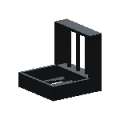
Grate Corner
ID=1004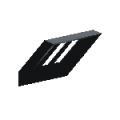
Grate Wedge
ID=1005


